08/Self-initiated product · 2026
Kagaz
Helps Indian parents check if a bill or message is real, and what to do next.
- Role
- Solo designer
- Type
- Self-initiated product
- Year
- 2026
- Platform
- Mobile web
- Scope
- Research, flows, UX, UI, prototype, video
In short
Problem
Bills and bank messages are written in formal English. Many parents can't read them easily. Scammers use this. Fake “your power will be cut tonight” messages have cost people ₹50,000 to ₹6 lakh.
What I did
I designed Kagaz. You take a photo of a bill or message. Kagaz tells you in simple Hindi if it is real or fake, what to do, and by when. You can listen to the answer and share it with family in one tap.
Result
6 screens, a clickable prototype and a 48-second video. It is a concept and not tested with users yet. Next step: test it with 5 parents.
6
screens, covering a fake message and a real bill
5
questions every answer covers: what is it, is it real, do I act, by when, what next
1
tap to tell your son or daughter
These describe the scope of the work. Results were not measured in this project.
The story
Ramesh ji's evening
This is the moment Kagaz is designed for.
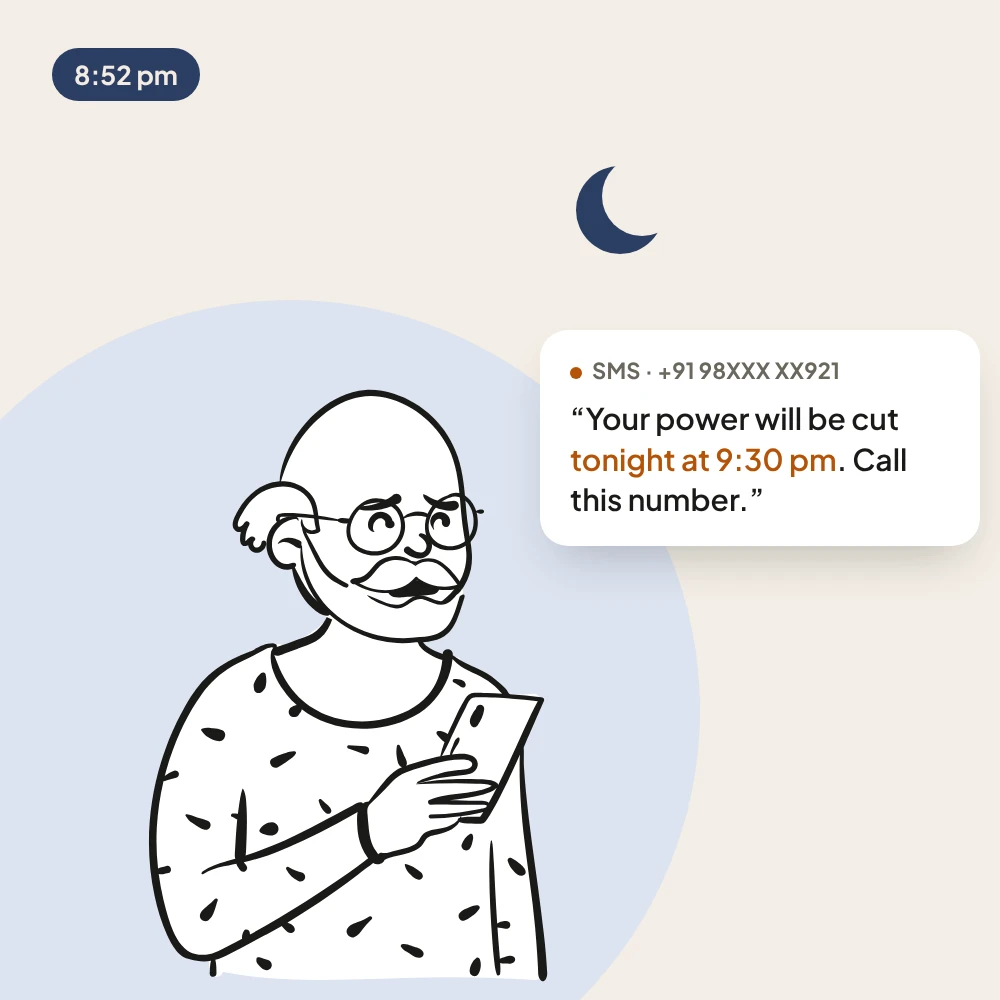
01 · 8:52 pm
Ramesh ji, 68, gets an SMS: his power will be cut tonight unless he calls a number.
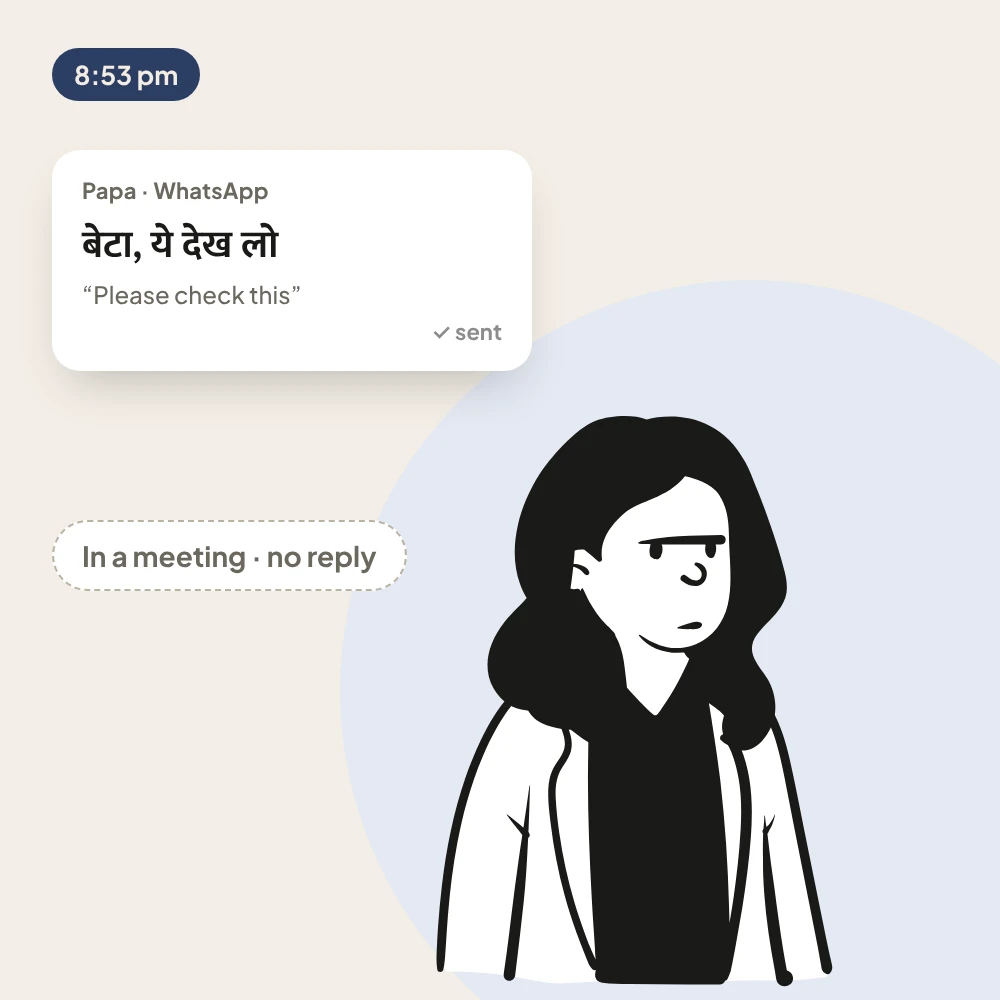
02 · 8:53 pm
He sends it to his daughter Priya. She is in a meeting. No reply.
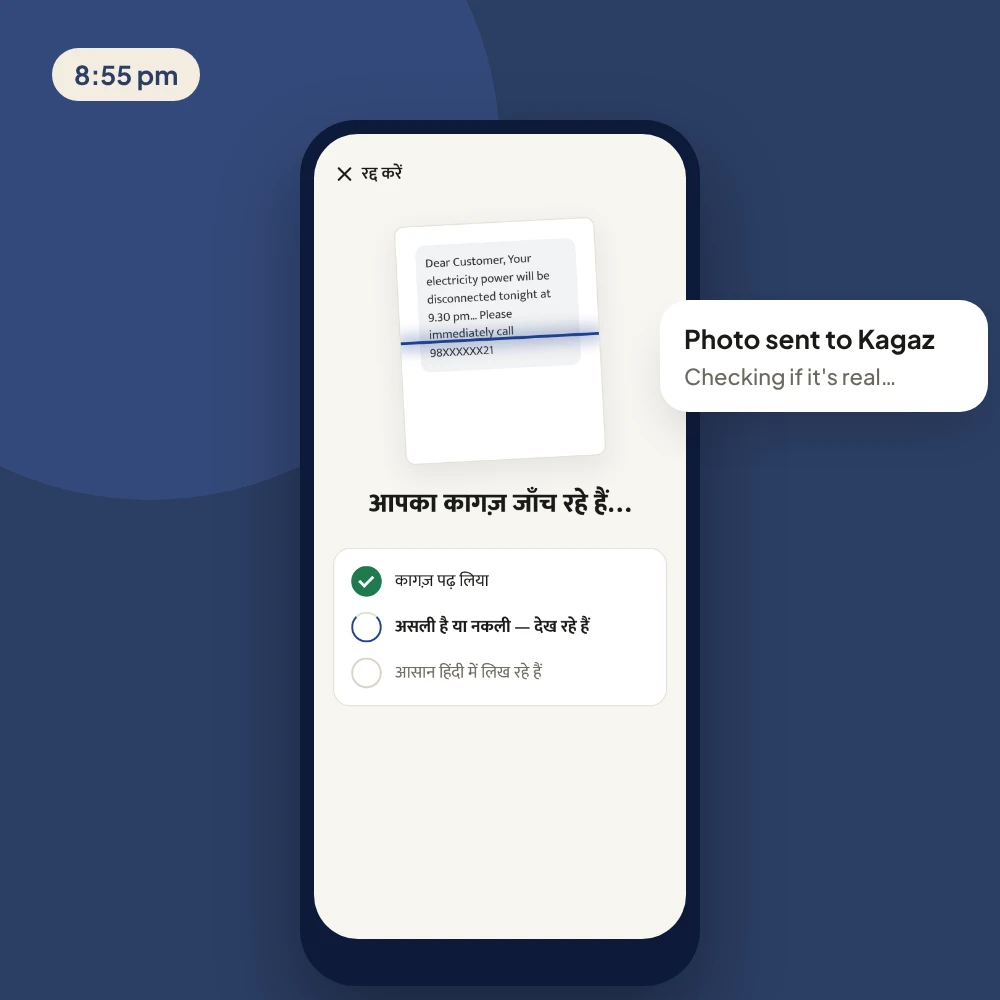
03 · 8:55 pm
He opens Kagaz and takes a photo of the message.
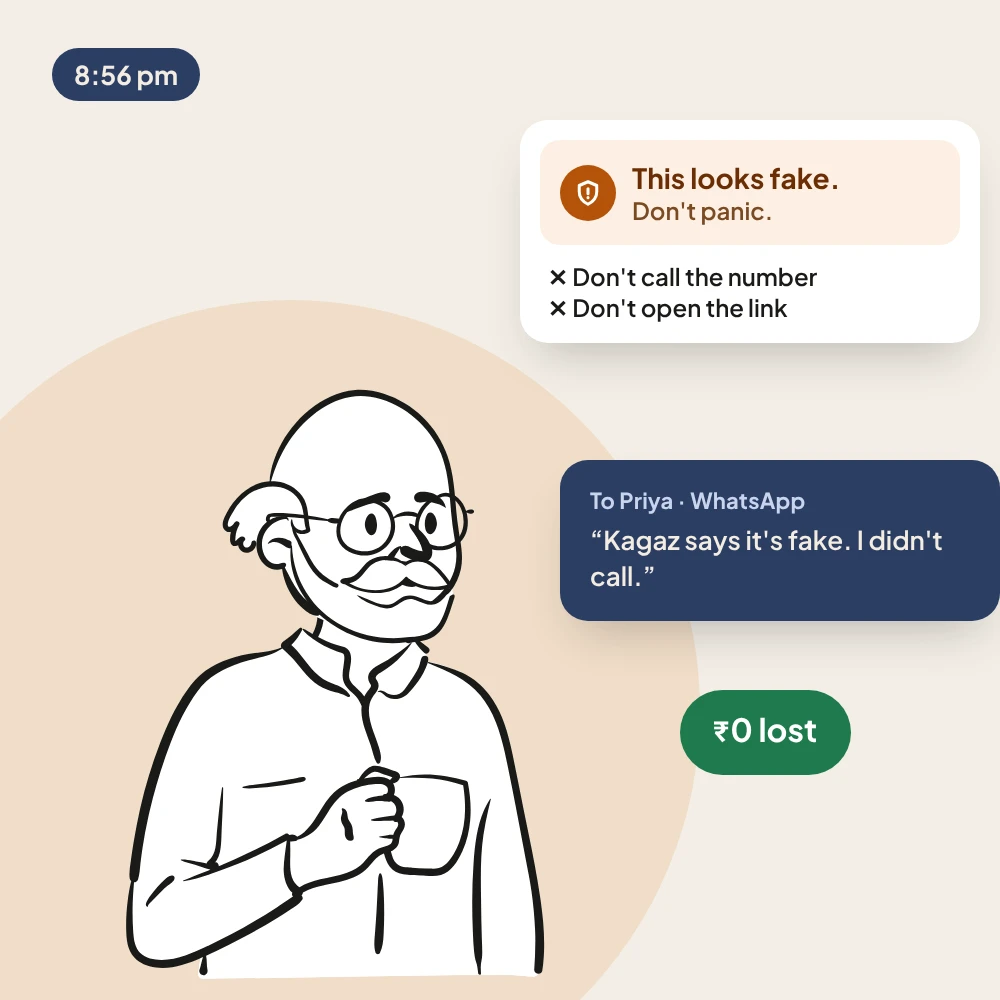
04 · 8:56 pm
Kagaz says it looks fake and tells him not to panic. He doesn't call. Priya gets the update.
An illustrated example. Ramesh ji and Priya are not real people. Characters from Open Peeps by Pablo Stanley.
01/Context
Background
Kagaz (कागज़ means “paper”) helps people understand bills, letters and messages. Take a photo, and Kagaz tells you in simple Hindi if it is real or fake, what to do, and by when. This is a concept I started myself. It is not tested with users yet, and the bill and names are examples.
My role
I did everything myself: research, positioning, user flow, UX, UI, the clickable prototype and the video. I used Claude as a design partner to work faster.
Setting
The main users are parents aged 50+. They use WhatsApp every day and read Hindi well, but read official English slowly. They usually open Kagaz when they are worried. So every screen had to be calm, clear and simple, with one main button.
Who it's for
Parents aged 50+
Know quickly if a bill or message is real, and what to do.
Struggles with: Formal English, scary deadlines, and nobody to ask at night.
Their grown-up children
Help their parents from another city, quickly.
Struggles with: They get photos saying “ye kya hai?” (“what is this?”) at work and reply hours later.
02/Problem
What needed solving
Most official papers in India are in formal English. But only about 10% of Indians said they speak English in the 2011 Census. Scammers take advantage of this. A common trick is a fake SMS that says “your power will be cut tonight, call this number”. Power companies say they never send messages like this. But at night, alone, it feels real.
What the data says
Before designing, I checked if the problem is real and how big it is, using public data and official warnings. I haven't interviewed users yet. That is the next step.
10.6%
of Indians said they speak English in the 2011 Census. Most bills and notices are in English.
Source: Census 2011, via Wikipedia₹22,495 cr
reported lost to cyber fraud in India in 2025, from over 24 lakh complaints.
Source: National Cyber Crime Reporting Portal, via Free Press Journal1,03,488
senior citizens reported financial fraud in 2025, losing ₹4,005 crore.
Source: Ministry of Home Affairs, via NewKerala₹50K–6L
lost by single people to fake “power will be cut tonight” messages in Bengaluru and Delhi.
Source: Udayavani and The Week
The information to stay safe already exists. It just doesn't reach people at the moment they are holding the paper.
What made it hard
- 01
AI apps already exist
ChatGPT and Gemini can read a photo. So Kagaz must be better for one group of people, not smarter.
- 02
Fear makes people rush
A scary message makes people call the number fast. The answer must calm them first.
- 03
Reading is tiring
Long answers, small text and English words lose the people who need help most.
- 04
AI can be wrong
With money and legal papers, people need a way to check the answer.
Design goals
- 01How might a parent know in seconds if a message can be trusted?
- 02How might every answer be a clear decision, not a long summary?
- 03How might a warning calm people instead of scaring them?
- 04How might the family know, without a phone call?
03/Process
How I approached it
5 steps, from understanding the problem to the final design.
- Step 1
Research
Collected public data on English reading, cyber fraud and official warnings about fake power bills.
Output: A real, proven problem
- Step 2
Compare
Checked how ChatGPT, Gemini, Google Lens and the government's Chakshu portal handle a suspicious message.
Output: Where Kagaz is different
- Step 3
Flow
Mapped two paths: a fake message (stop, then tell family) and a real bill (pay on time, get a reminder).
Output: 6-screen flow
- Step 4
Design and review
Designed every screen, then reviewed the whole flow. I cut the home screen to one main button and made the warning calm.
Output: Final screens
- Step 5
Prototype
Built a clickable prototype and a 48-second video showing both paths.
Output: Prototype and video
Where existing tools fall short
AI tools can already read a photo. So I compared what people get today when they try to check a suspicious message.
| Question | ChatGPT / Gemini | Google Lens | Chakshu (Govt.) | Kagaz |
|---|---|---|---|---|
| Made for | People who know what to ask | Reading and translating text | Reporting a fraud message | Parents 50+ who don't use AI apps |
| What you get | A long answer | A translation | A complaint form | One card: real or fake, what to do, by when |
| Checks if it's fake | Only if you ask | No | No, you report it | Always, first |
| Hindi voice answer | In voice mode | No | No | One tap on every answer |
| Tells your family | No | No | No | One tap, message ready |
Kagaz doesn't try to be smarter than these tools. It is made for one group of people, and it gives a decision, not a summary.
04/User flow
The journey, step by step
5 steps. The outlined ones are where AI does the work.
- 01
Open
One big button: take a photo
- 02AI
Check
Three steps tick while Kagaz reads it
- 03AI
Answer
Real or fake, what to do, by when
- 04
Act
Set a reminder, or don't call the number
- 05
Tell family
One tap to WhatsApp, message ready
Every screen fits on one phone screen and has one main button. Nobody has to scroll to find what to do.
AI-assisted step
05/Decisions
Key design decisions
The few choices that shaped the product most.
- 01
Real or fake comes first
Every answer starts with a colored box that says real or fake.
- 02
A decision, not a summary
One big line with the action, amount and date. Then the late fee.
- 03
Calm, not scary
A soft orange box that says “Don't panic, just don't trust it”. My first design was red; I changed it.
- 04
Show the source
Every answer shows the exact words from the paper or message.
- 05
Family in the loop
One tap sends the answer to a family member on WhatsApp.
- 06
Never looks like a scam
No login. The home screen says Kagaz never asks for money or OTP.
How the warning changed
My first design for a fake message used a big red warning. When I reviewed it, it felt like an emergency. That is the same panic scammers want. So I redesigned it.
What changed
- 01Red banner and warning triangle → soft orange box with a shield.
- 02“Warning! This is a fraud” → “This message looks fake. Don't panic, just don't trust it.”
- 03Red crosses → calm grey icons for what not to do.
- 04Long numbered list → three short reason tags.
- 05Yellow emergency box → one quiet line about the 1930 cyber helpline.
- 06Too long to fit → fits on one phone screen. I did this for every screen.
Fear makes people act fast, and acting fast is how they lose money. A calm screen helps them stop and think.
06/Final design
The final screens
Try the prototype, watch the 48-second video, then see each screen up close.
Tap “English” to see English helper lines. Real photo checking is coming soon. Open full screen ↗
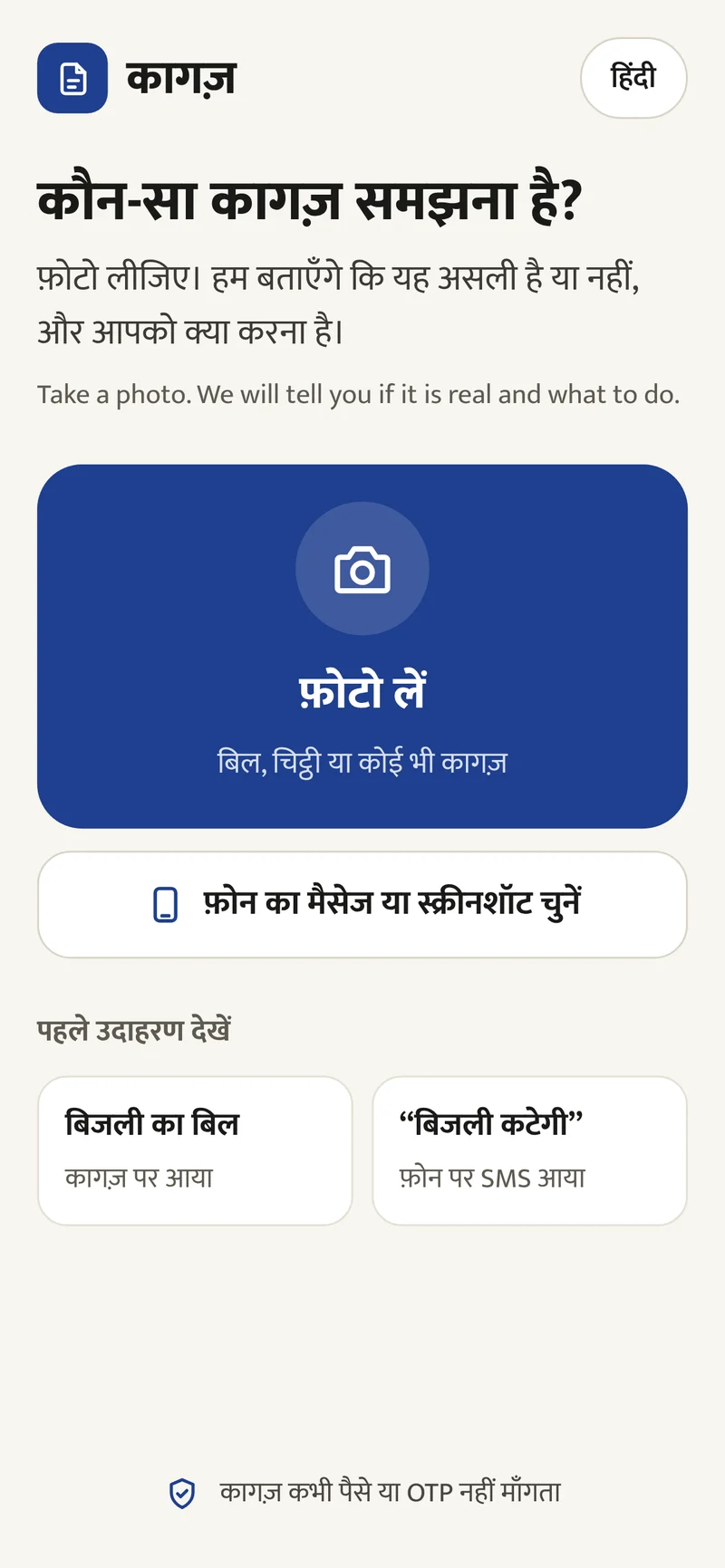
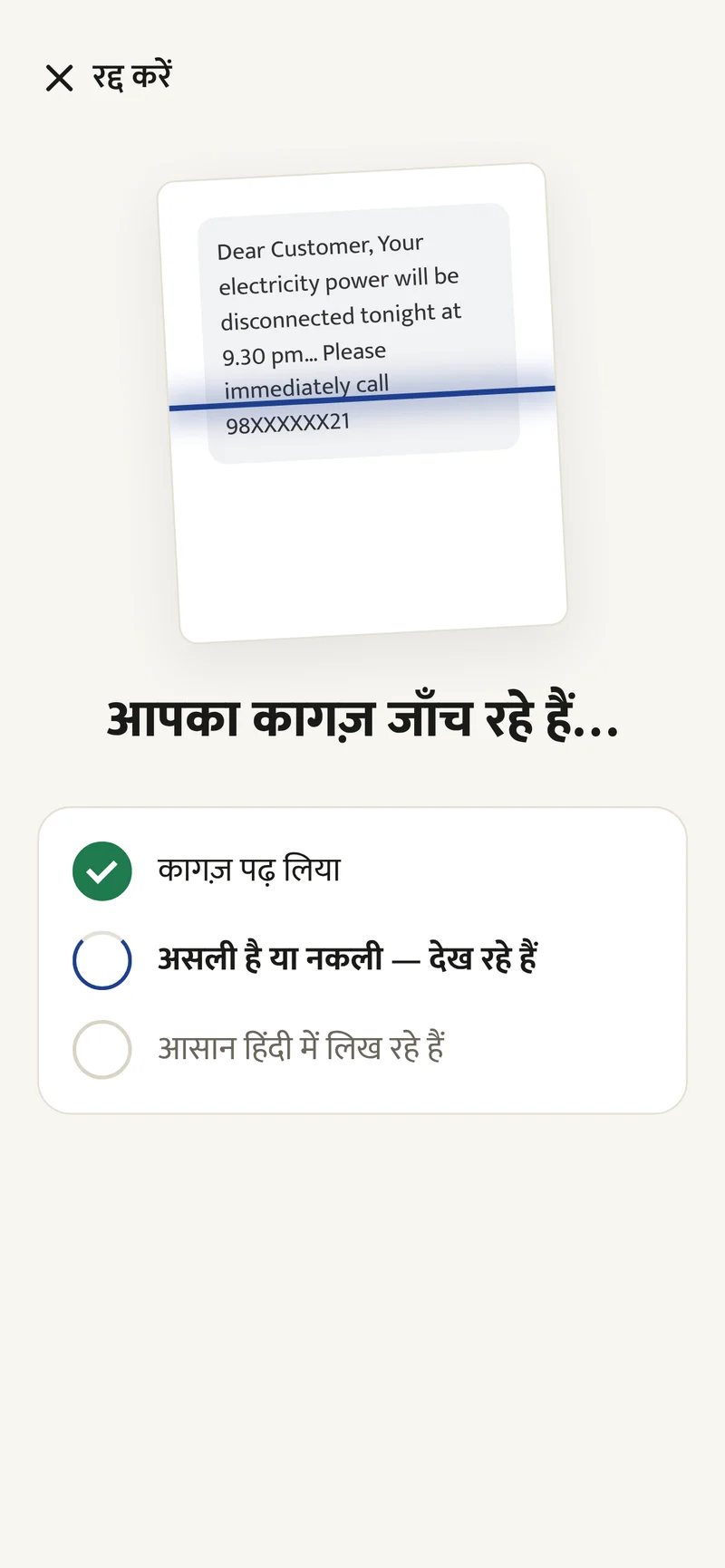
- 01HomeOne big photo button, a screenshot option, two examples, and “Kagaz never asks for money or OTP”.
- 02CheckingThree steps tick one by one, so waiting feels like progress.
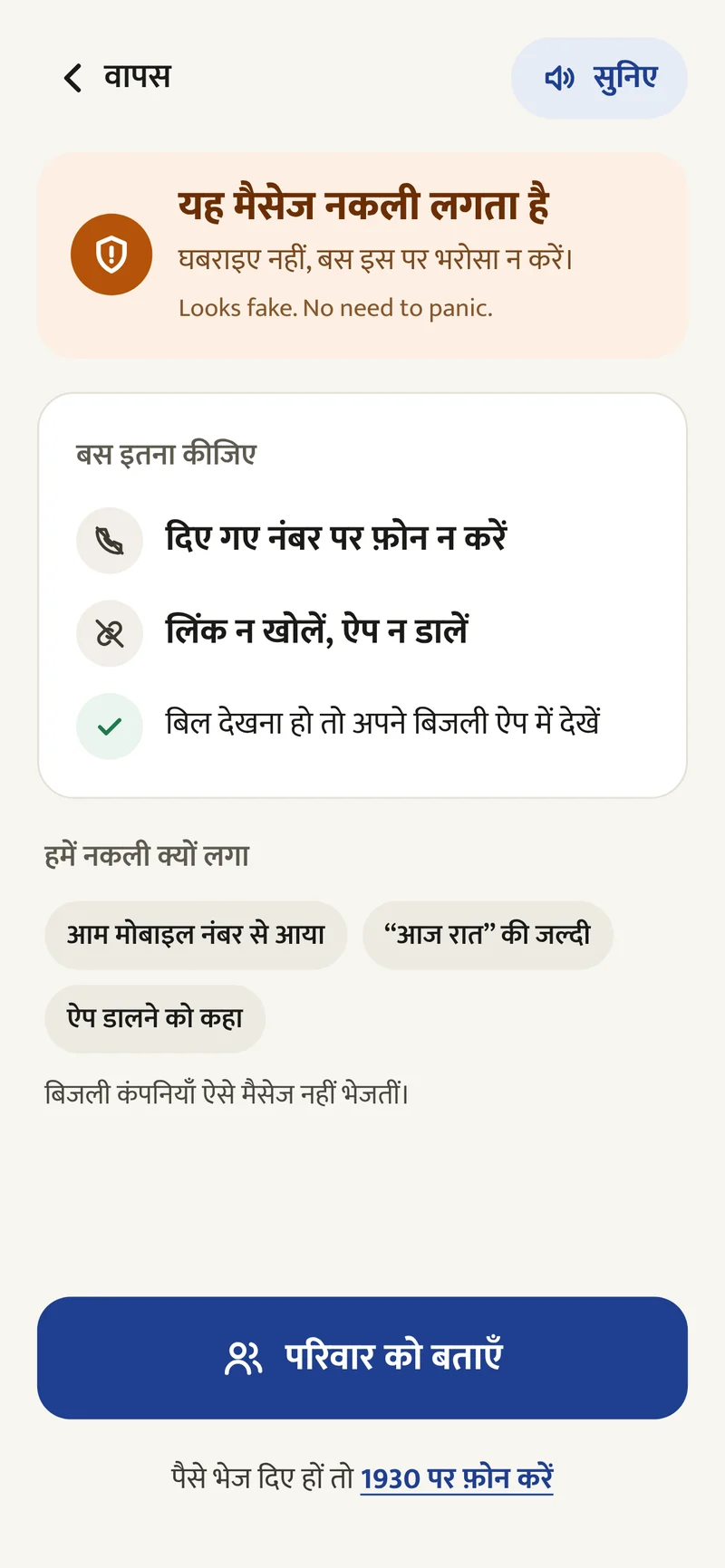
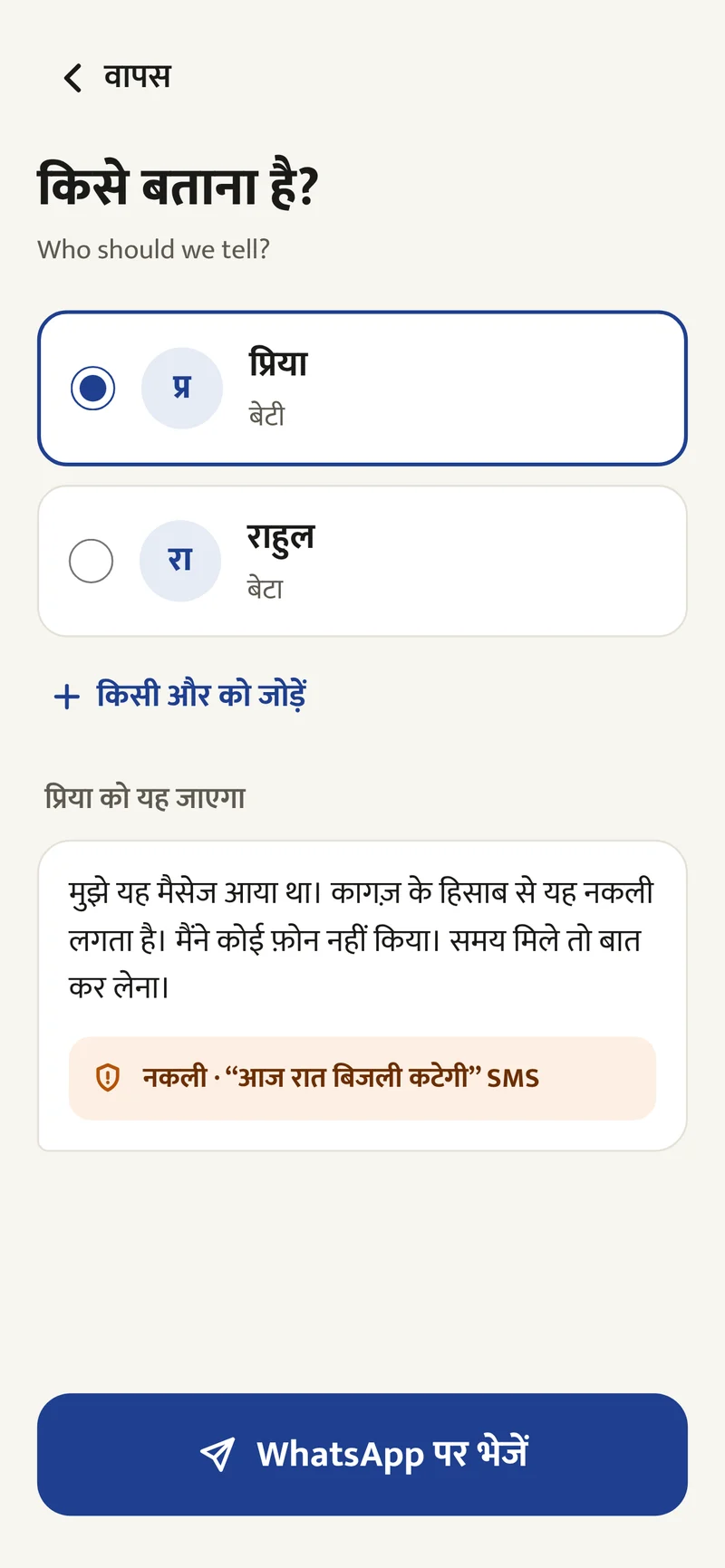
- 01Fake result“Don't panic, just don't trust it”, two things not to do, and the reasons as short tags.
- 02Tell familyPick a saved person. The WhatsApp message is already written.
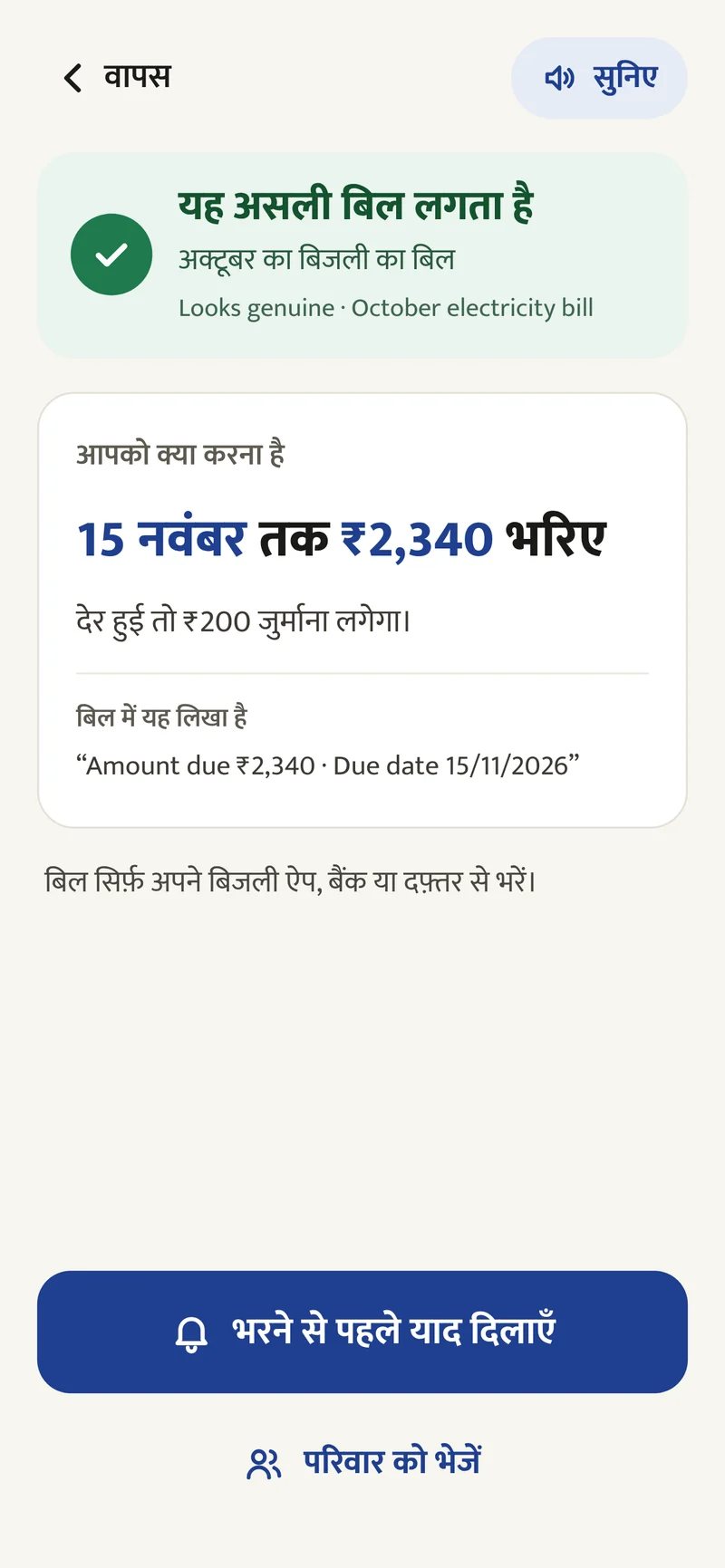
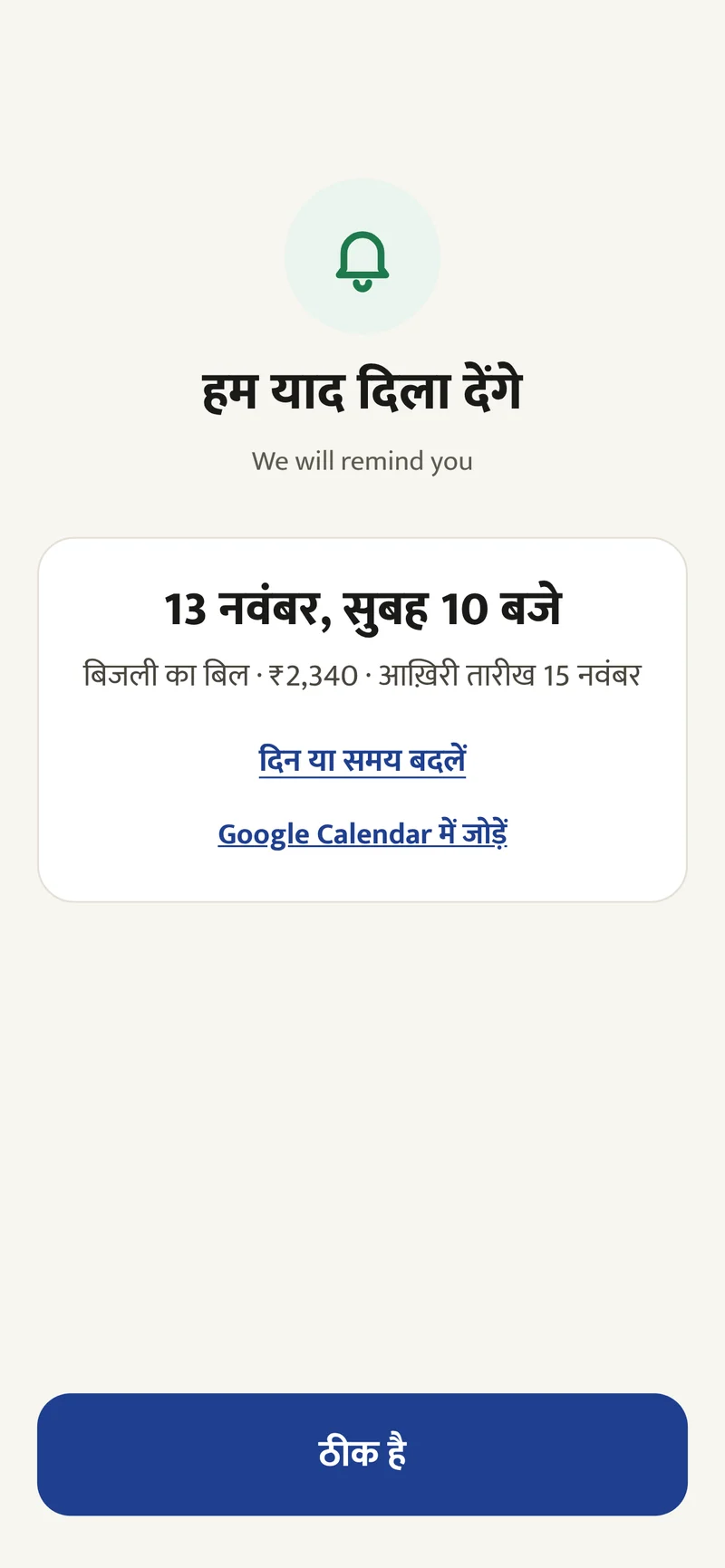
- 01Real result“Pay ₹2,340 by 15 November”, the late fee, and the exact words from the bill.
- 02Reminder2 days before the due date at 10 AM, with a calendar option.
Design system
Hindi first, big text and one deep blue for buttons. Status colors are soft, and they differ in lightness too, so color-blind users can tell them apart.
- Font
- Mukta, which works for Hindi and English. Body text is 17–19px.
- Status boxes
- Soft green for real, soft orange for fake. Never alarm red.
- Answer card
- One line, the deadline, then the exact words from the paper.
- Buttons
- 56–66px tall. One main button per screen.
- Listen
- A “सुनिए” (“Listen”) button reads the answer aloud in Hindi.
- English helper
- A small English line under main headings. It can be turned off.
When things don't go to plan
An app that judges money and legal papers must be honest when it's not sure. These rules are part of the product plan.
- 01
Not sure
Kagaz says “We can't be sure” and suggests asking someone you trust. It never guesses “real”.
- 02
Serious papers
For court, police, tax or medical papers, Kagaz gives a short summary and says to check with an expert.
- 03
Blurry photo
If Kagaz can't read the photo, it asks for a new one with a tip. It doesn't guess.
- 04
Already paid or shared OTP
Every fake result ends with the 1930 cyber helpline, as one calm line.
- 05
No due date
The reminder button only shows when there is a date.
- 06
Privacy
No login. Photos are not saved. Kagaz never asks for money or OTP.
07/Impact
Where it landed
Back to the goals
- 01
How might a parent know in seconds if a message can be trusted?
Every answer starts with real or fake: soft green for real, soft orange for fake.
See it in A fake message ↑ - 02
How might every answer be a clear decision, not a long summary?
One line says what to do and by when: “Pay ₹2,340 by 15 November”.
See it in A real bill ↑ - 03
How might a warning calm people instead of scaring them?
The fake result says “Don't panic” and lists only what not to do.
See it in A fake message ↑ - 04
How might the family know, without a phone call?
One tap sends a ready-made WhatsApp message to a family member.
See it in A fake message ↑
How I'll measure success
These are goals for a first test with 20 people. They are targets, not results.
- 01Understood4 out of 5 parents know what to do after one lookThe main idea is a clear decision, not a summary.
- 02TrustedThumbs up on at least 80% of answersPeople won't act on an answer they don't trust.
- 03Used again1 in 3 people check a second paper within 14 daysComing back shows it is useful.
- 04Fakes caughtCount every fake message found and confirmedThis is the real impact.
- 05Family toldHow often fake results are shared with familyShows if the family feature works.
Outcome
- 01Designed 6 screens for two paths, and changed the warning from scary to calm.
- 02Built a clickable prototype and a 48-second video for both paths.
- 03A concept with example data, not tested yet. Next: a test with 20 parents.
A calm second opinion for the moment a scary message arrives.
08/Learnings
What I took away
Designing for older users isn't about making things bigger. It's about removing choices. And when the topic is fraud, how a warning feels matters as much as what it says.
What I'd do next
- 01Test the prototype with 5 parents and note where they get stuck.
- 02Build the working version with real photo checking.
- 03Measure how many fake messages it catches and how many people come back.